Freelancers and small business owners have one thing in common: they spend far too much time on invoicing. Chasing payments, formatting documents, manually calculating taxes, reconciling what's been paid and what hasn't — it adds up to hours every month that could go toward actual work.
Most accounting software makes this worse, not better. Full-featured platforms designed for accountants come with hundreds of features most small businesses will never use, steep learning curves, and pricing that doesn't make sense for a one- or two-person operation.
3S Invoice was built to fix that.
The problem it solves
When you're running a small business, your needs aren't complicated. You need to create invoices, send them to clients, track whether they've been paid, and record your expenses. That's about it.
The problem is finding software that does exactly that — and nothing more. Most tools either do too little (basic spreadsheet templates) or far too much (enterprise accounting suites that require an onboarding session to understand). 3S Invoice sits in the middle: focused, complete, and genuinely easy to use.
What is 3S Invoice?
3S Invoice is a simple invoicing app developed by 3S Coding specifically for freelancers and small businesses. It is deliberately not accounting software, and it doesn't try to replace your accountant. It's designed around a single principle: invoicing should be the easy part of your week.
The app is built for people who don't have an accounting background — you don't need to know the difference between debits and credits to use it. You input your information, and the app handles the formatting, calculations, and record-keeping.
Key features
Customer and client management
Create a database of your customers with all the relevant details — name, address, email, phone number. Once a client is in the system, creating an invoice for them starts with picking their name: the details are filled in automatically.
Product and service catalog
Define your products or services once — name, description, price, applicable taxes or discounts. When building an invoice, you pick from your catalog rather than typing the same descriptions over and over. Pricing stays consistent, and you can update rates in one place when they change.
Invoice creation and sending
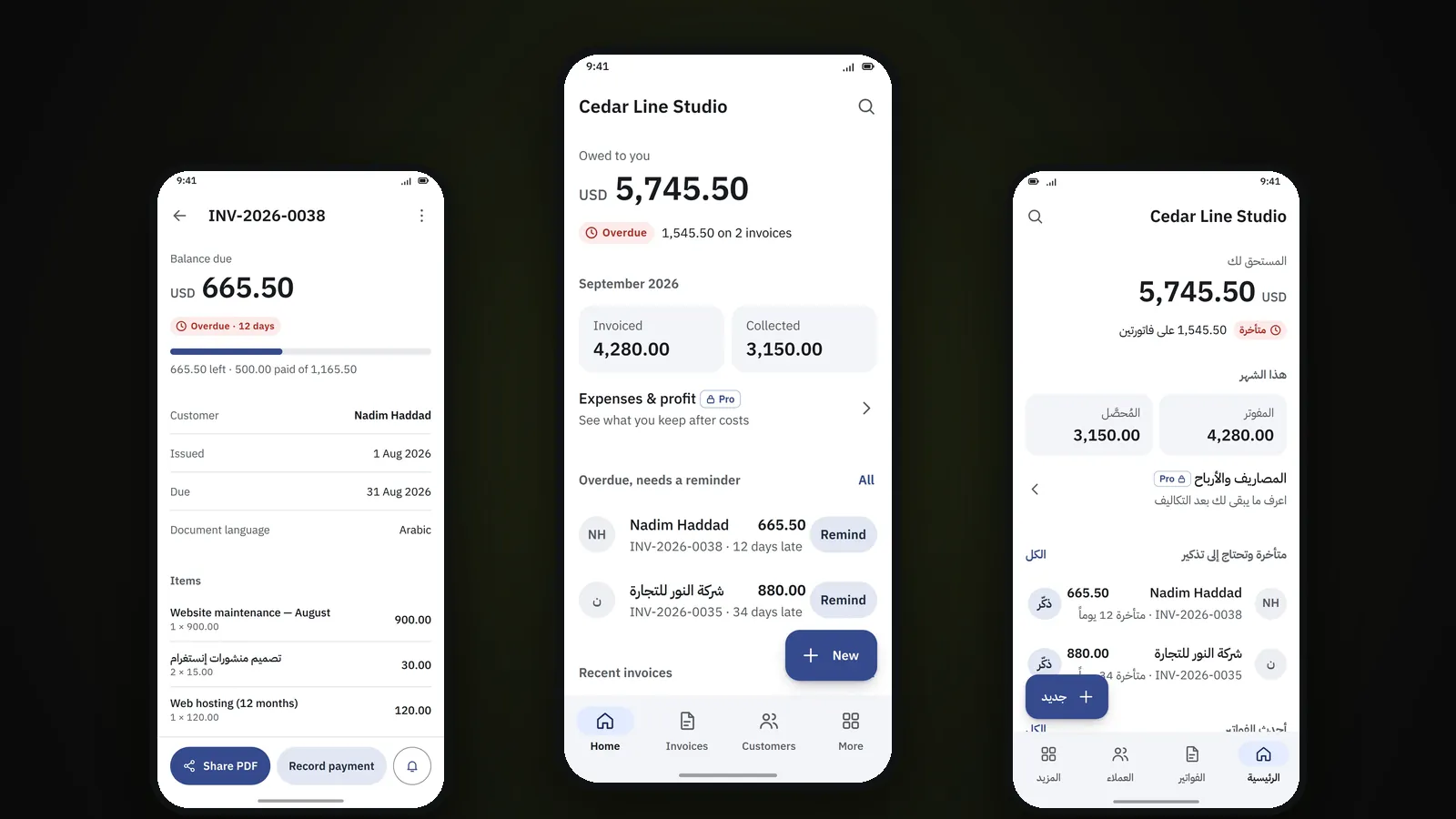
The core feature. Create professional PDF invoices with your logo and details, add line items from your catalog, apply taxes and discounts, and share them through WhatsApp, email, or any other app on your phone. Every invoice is tracked: you can see at a glance what's been paid, what's partly paid, and what's overdue — and send a reminder when it's late.
Expense tracking (Pro)
Record business expenses, sort them into categories, and link them to a project if you want to know what that project actually earned. Keeping expense records organized is essential come tax time — 3S Invoice Pro makes it part of your normal workflow rather than a once-a-year scramble.
Why use it
- Speed — Once your clients and products are set up, an invoice is a customer, a few lines from your catalog, and a PDF to share.
- Professionalism — Branded invoices with consistent formatting make a better impression than manually formatted documents.
- Cash flow visibility — Knowing exactly what's paid, pending, and overdue helps you manage your finances proactively rather than reactively.
- Cost — The free version has unlimited customers and invoices, and it isn't a trial. Pro is a $99 lifetime licence or $30 a year, and nothing is billed monthly.
- No learning curve — No accounting knowledge required. If you can fill in a form, you can use 3S Invoice.
The best tool for a job is the one you'll actually use. 3S Invoice is built to stay out of your way.
Who it's for
3S Invoice is designed for freelancers, consultants, and small business owners who invoice clients regularly and need a reliable way to track what's been paid. If you're currently managing invoices in a spreadsheet, in Word, or through a tool that's more complicated than your needs, 3S Invoice is worth a look.
It's not designed for businesses that need payroll processing, multi-currency accounting, or complex financial reporting. For those needs, a full accounting suite makes more sense. But for the majority of small operations — a few clients, regular invoicing, basic expense tracking — it's exactly the right scope.